Running LLMs on a HPC cluster
This is a guide on setting up an Ollama server to run LLM models on a HPC cluster with GPUs. The Ollama server is hosted on a GPU node, while the inferencing can be done from any other node on the cluster.
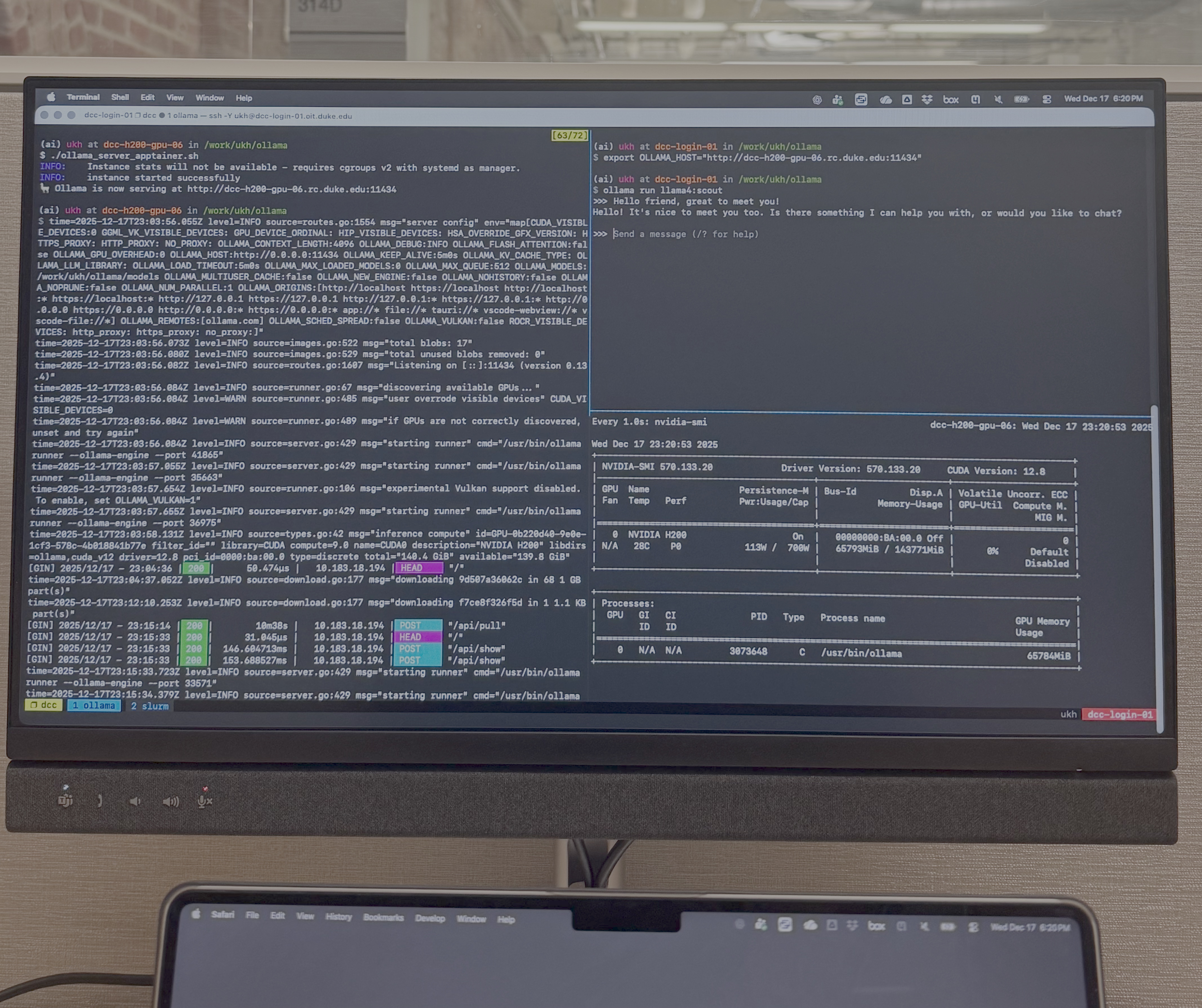
Large Language Models (LLMs) have become ever so popular, especially with broader access to computational resources such as HPC clusters and GPUs along with tools like Ollama that allow users to access open-source LLM models. In this guide, I will walk you through how to set up an host Ollama server on a GPU node on a HPC cluster which can be used for inference from other nodes. This post was inspired by an article by Afif so kudos to him for laying down the ground work.
The setup discussed here was tested on Duke University’s DCC cluster and the NCShare cluster, both consisting of NVIDIA H200 GPU nodes (DCC has a variety of other GPU models as well, but we will only talk about H200s since they are the most powerful).
Initial setup
1. Usually, on HPC clusters, you won’t have root privileges to install applications, so we are going to first build a simple Apptainer container with Ollama in it. If you already have ollama, you may skip this setup. Create the ollama.def file shown below in some working directory on your cluster. For the purpose of this guide, my working directory where I keep all the files and models mentioned is /work/ukh/ollama.
ollama.def:
Bootstrap: docker
From: ollama/ollama:latest
Then build the container with,
export APPTAINER_CACHEDIR=/work/${USER}/tmp
export APPTAINER_TMPDIR=/work/${USER}/tmp

apptainer build ollama.sif ollama.def
If successful, the Ollama container, ollama.sif will be built in the same directory. The reason we changed the Apptainer tmp and cache directories was because the default /tmp sometimes fills up leading to build failures.
You may download an ollama binary through conda with (I assume you have created some conda environment for the ollama procedure) ,
conda install -c conda-forge ollama
however, I noticed that this does not utilize the GPUs when used as the server like the original ollama application does, but it can be used as the client for inference. So install it anyways.
2. We will also use the ollama API to run some Python code, so go ahead and install the Python libraries,
pip install ollama
Starting Ollama server on the GPU node
We will host the Ollama server on a H200 GPU node and run inference from other nodes on the cluster.
1. Create a bash script, ollama_server_apptainer.sh and modify it to suit your environment,
ollama_server_apptainer.sh:
#!/bin/bash

# Configuration
CONTAINER_IMAGE="/work/ukh/ollama/ollama.sif"
INSTANCE_NAME="ollama-$USER"
MODEL_PATH="/work/ukh/ollama/models"
PORT=11434

# Unset variables to avoid conflicts
unset ROCR_VISIBLE_DEVICES

# Start Apptainer instance with GPU and writable tempfs
apptainer instance start \
  --nv \
  --writable-tmpfs \
  --bind "$MODEL_PATH" \
  "$CONTAINER_IMAGE" "$INSTANCE_NAME"

# Start Ollama serve inside the container in the background
apptainer exec \
  --env OLLAMA_MODELS="$MODEL_PATH" \
  --env OLLAMA_HOST="0.0.0.0:$PORT" \
  instance://$INSTANCE_NAME \
  ollama serve &

echo "🦙 Ollama is now serving at http://$(hostname -f):$PORT"
This will use the Apptainer container, ollama.sif, we built earlier to host a server in the background that looks for models stored in /work/ukh/ollama/models. It is important to host on 0.0.0.0 so that the server listens on all available network interfaces and not just localhost. Request an interactive session or submit a SLURM job script to request a GPU node. I will request an interactive session on a node with 1 H200 GPU, 300 GB of RAM, for 2 hours with,
srun -p h200ea -A h200ea --gres=gpu:h200:1 --mem=300G -t 2:00:00 --pty bash -i
Once you are in the GPU node, start the Ollama server by running the bash script, ollama_server_apptainer.sh,
chmod +x ollama_server_apptainer.sh
./ollama_server_apptainer.sh
You will see something like the following,
(ai) ukh at dcc-h200-gpu-06 in /work/ukh/ollama
$ ./ollama_server_apptainer.sh
INFO:    Instance stats will not be available - requires cgroups v2 with systemd as manager.
INFO:    instance started successfully
🦙 Ollama is now serving at http://dcc-h200-gpu-06.rc.duke.edu:11434
It is important to note the host: http://dcc-h200-gpu-06.rc.duke.edu and the port: 11434 the server is broadcasting on as we will need this information for the inference. If you already have an ollama setup in your environment that doesn’t require using Apptainer, you could use the following script, ollama_server.sh, in place of ollama_server_apptainer.sh.
ollama_server.sh:
#!/bin/bash

# Configuration
MODEL_PATH="/work/ukh/ollama/models"
PORT=11434

# Unset variables to avoid conflicts
unset ROCR_VISIBLE_DEVICES

# Model path
export OLLAMA_MODELS="$MODEL_PATH"

# Bind to all interfaces on that node, on port 11434
export OLLAMA_HOST="0.0.0.0:$PORT"

# Start Ollama server in the background
ollama serve &

echo "🦙 Ollama is now serving at http://$(hostname -f):$PORT"
Now that we have the Ollama server hosted, let’s see how we can use that to run inference using LLM models.
Running inference sessions
We could run the inference session either by using the ollama application directly, or through the Python API. We will discuss both methods below.
1. Using the Ollama application
The inferencing can be done either through the ollama application from the Apptainer container or the ollama binary from the conda setup.
If you are using the ollama instance installed form conda, from any node on the cluster, you can run,
export OLLAMA_HOST="http://dcc-h200-gpu-06.rc.duke.edu:11434"
export OLLAMA_MODELS=/work/ukh/ollama/models
ollama run llama4:scout
Here we download and run the LLM model, llama4:scout, which has 109 billion parameters. With the ollama application, it starts a chat session once the download is complete. Chat away, my friend …
You could use the ollama instance from the Apptainer container as well to achieve this with something like the following,
export OLLAMA_HOST="http://dcc-h200-gpu-06.rc.duke.edu:11434"
export OLLAMA_MODELS=/work/ukh/ollama/models
apptainer exec --env OLLAMA_HOST="$OLLAMA_HOST",OLAMA_MODELS="$OLLAMA_MODELS" ollama.sif ollama run llama4:scout
2. Using the Python API
This is more suited if you want to incorporate Python code in some workflow. For a Python script with a fixed prompt you can use the following script,
ollama_client.py:
#!/usr/bin/env python

from ollama import Client

HOST = "http://dcc-h200-gpu-06.rc.duke.edu:11434"
MODEL = "llama4:scout"
PROMPT = "Write a Python code that calculates the Fibonacci sequence up to 15."

client = Client(host=HOST)

# Check if model already exists
resp = client.list()
models = resp.models
model_names = [m.model for m in models]

if MODEL not in model_names:
    try:
        print(f"Pulling model '{MODEL}'...")
        client.pull(model=MODEL)
    except Exception as e:
        print(f"Could not pull model: {e}")

# Stream output token by token
for chunk in client.chat(
    model=MODEL,
    messages=[{"role": "user", "content": PROMPT}],
    stream=True,
):
    print(chunk.message.content, end="", flush=True)
print("\n")
Run it with,
./ollama_client.py
If you want to use the Python API as a chat client, you may use the following code instead,
ollama_client_chat.py:
#!/usr/bin/env python

from ollama import Client

HOST = "http://dcc-h200-gpu-06.rc.duke.edu:11434"
MODEL = "llama4:scout"

def main():
    client = Client(host=HOST)

    # Check if model already exists
    resp = client.list()
    models = resp.models
    model_names = [m.model for m in models]

    if MODEL not in model_names:
        try:
            print(f"Pulling model '{MODEL}'...")
            client.pull(model=MODEL)
        except Exception as e:
            print(f"Could not pull model: {e}")

    # Start the conversation with an optional system prompt
    messages = [
        {
            "role": "system",
            "content": "You are a helpful assistant for an HPC user.",
        }
    ]

    print(f"Connected to {HOST} using model {MODEL}")
    print("Type 'exit' or 'quit' to leave.\n")

    while True:
        try:
            user = input("You: ").strip()
        except (EOFError, KeyboardInterrupt):
            print("\nBye!")
            break

        if not user:
            continue
        if user.lower() in {"exit", "quit"}:
            print("Bye!")
            break

        # Add user message to the conversation
        messages.append({"role": "user", "content": user})

        print("Model:", end=" ", flush=True)
        assistant_text = ""

        # Stream the response token by token
        for chunk in client.chat(
            model=MODEL,
            messages=messages,
            stream=True,
        ):
            if chunk.message.content:
                print(chunk.message.content, end="", flush=True)
                assistant_text += chunk.message.content
        print("\n")

        # Add assistant reply to history so the model remembers context
        messages.append({"role": "assistant", "content": assistant_text})

if __name__ == "__main__":
    main()
Feel free to play around with different LLM models you can find online, for example, at https://github.com/ollama/ollama.
Once you are done with your LLM session, stop the server we started on the GPU node with,
apptainer instance stop ollama-$USER



Comments